
How to read a website traffic campaign (panel vs GA4)

- August 27th, 2026
- By
- Editorial
- No Comments


If you buy website traffic and then open Google Analytics, you will almost always see a different number than the one in your seller’s dashboard. That gap is where most people decide the campaign “didn’t work.” Often the traffic did arrive. The tools are just counting different things.
This post walks through one native-ads campaign the way we read them internally: what you ordered, what the Netotraffic panel shows, and what GA4 shows for the same dates. Use it as a checklist on your next order. The numbers in the example are illustrative so the story is easy to follow — replace them with yours when you have a live campaign.
Why three numbers show up for one campaign
A single order produces at least three counts. Mixing them up is the usual reason support tickets start with “I got nothing.”
- Ordered — the visitors you paid for. For us, that is the minimum we guarantee for that campaign.
- Panel unique IPs — what we delivered to the URL you put on the order. One unique IP, one count for that campaign.
- GA4 sessions — what Google counted after your Analytics tag ran on the page, for the UTM you used.
There is often a fourth number: leads, sales, or signups. That belongs to your landing page and offer. Traffic can be delivered cleanly to a page that does not convert. Fixing the page is a different job from measuring delivery.
Native ads (our Google Analytics Traffic product) are the right product when you need a clean source in GA4. Banner / website ads are different: many placements do not pass a clean referrer, so GA4 may look empty even when the panel is filling. If you need sessions you can filter, order native ads and tag the URL before checkout. More on choosing a type is in our step-by-step buying guide.
Before you start the campaign
Most “zero in Analytics” cases start here, not after delivery.
- The landing page loads on mobile and desktop. No malware, no surprise autoplay audio, no broken checkout.
- GA4 (or your tag) already fires on the exact URL you will order — not only on the homepage. Quick check: open the URL, DevTools → Network, filter
collectorg/collect, reload. You should see hits to Google. - For native ads, put the UTM on the real URL before you order, for example:
https://yoursite.com/offer/?utm_source=netotraffic&utm_medium=native&utm_campaign=us-health-test - Use
utm_source=netotrafficevery time so every campaign is easy to find in Acquisition.
If the page is slow, empty, or the tag is missing, stop. Buying more visitors will not fix it. Full checklist: how to see Netotraffic visits in GA4.
During delivery
On working days, native ads and banners usually start within a few hours, up to about a day. Open the stats panel and check delivered vs remaining, geo, and status. Pause if the URL is wrong — then fix the page or the tag before you resume or reorder.
In GA4, Realtime is optional and noisy. Standard Acquisition reports lag. Compare the same date range in the panel and in GA4 after a full day, not after twenty minutes. Filter Traffic acquisition to session source netotraffic (or the exact utm_source you used).
Example: one native-ads campaign, end to end
Here is how the three screens line up when everything is set up correctly. Treat the figures as a teaching example for United States / Health / native ads over one week.
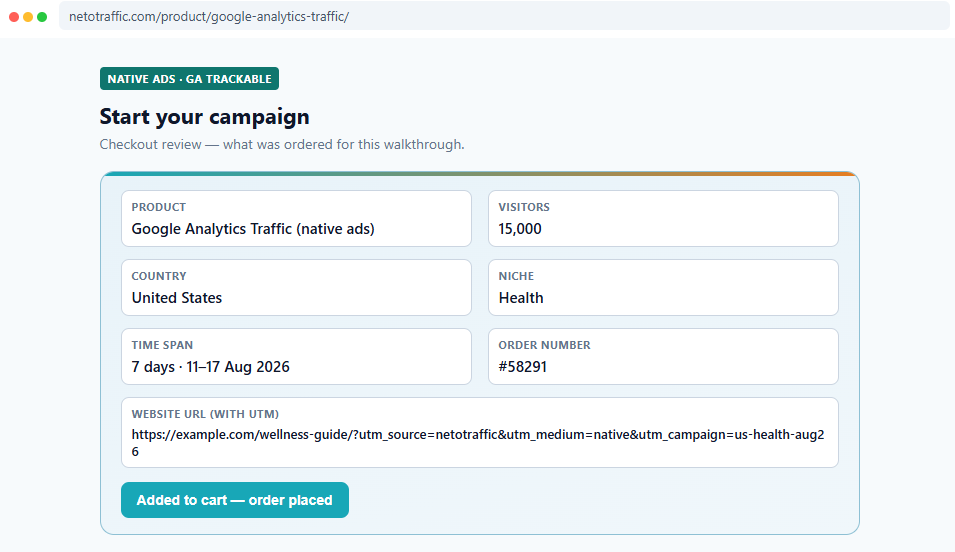
What was ordered
Product: Google Analytics Traffic (native ads). Country: United States. Niche: Health. Volume: 15,000 visitors over 7 days. Website URL includes utm_source=netotraffic, utm_medium=native, and a campaign name so you can find the row later.
That is the “ordered” number: 15,000. Everything else is measured against that.
What the panel counted
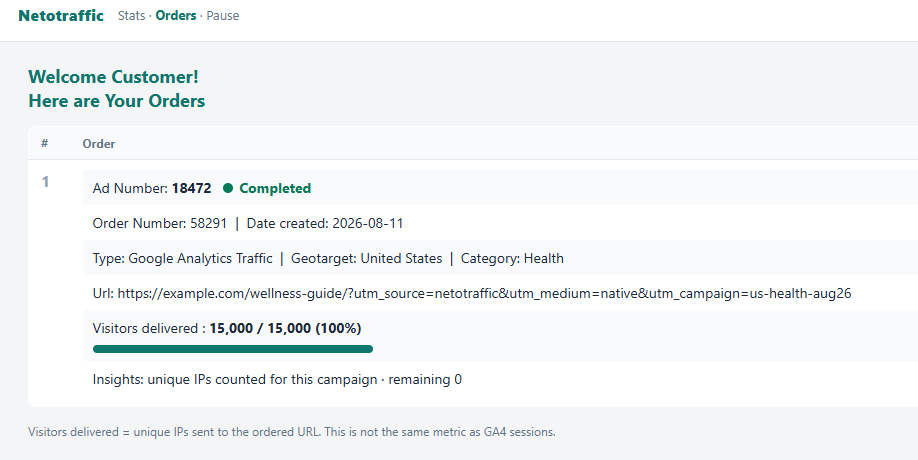
After the campaign finishes, the stats panel for that ad shows visitors delivered vs total — for example 15,000 / 15,000 (100%). That count is unique IPs sent to the ordered URL. Remaining is 0 when delivery is complete.
This is the delivery number. It is not “users” in Google Analytics and it is not “conversions.”
What GA4 counted
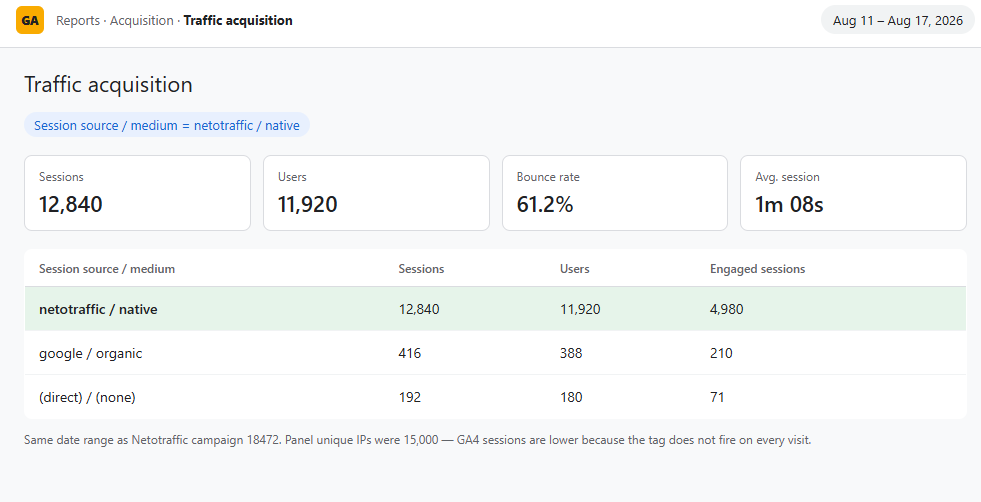
In Reports → Acquisition → Traffic acquisition, same dates, filter or look for session source / medium netotraffic / native. In a healthy setup you often see something like ~12,000–13,000 sessions against 15,000 panel IPs — not a 1:1 match.
Why the gap? Ad blockers, people who close the tab before the tag fires, consent banners, redirects that strip the UTM, and GA4’s own session rules. Use GA4 to confirm the landing page received sessions from your tagged URL. Use the panel to see what we delivered.
Bounce rate and time on site are about your page. High bounce with full delivery means fix the page, not “buy again and hope.”
How to read a mismatch
| What you see | What it usually means | What to do |
|---|---|---|
| Panel a bit above GA4 | Normal (blockers, tag delay) | Keep going if the page looks fine |
| Panel far above GA4, or GA4 = 0 | Wrong URL, no tag, UTM stripped, or you bought banners expecting a native-ads source row | Pause. Fix tag or URL. Don’t buy more yet |
| GA4 far above the panel | Filter is too wide — other sources mixed in | Filter exactly on utm_source=netotraffic |
| IPs delivered, bounce near 100% | Landing page, offer, or load time | Fix the page, then resume or reorder |
In the example above, 15,000 panel vs ~12,800 GA4 sessions is the first row: a gap, not a failed delivery. If GA4 is empty while the panel fills on a native-ads order, something is wrong with the URL or the tag — that is when you pause.
A simple log for your next order
Copy this into a note and fill it after one real campaign. Three screenshots (order, panel, GA4) with the same dates turn this into your own case study. Blank lines until you have data:
- Date range:
- Product:
- Geo / niche:
- URL (with UTM):
- Ordered:
- Panel unique IPs:
- GA4 sessions (source = netotraffic):
- Bounce / conversions (your GA4 or CRM):
- Action taken (pause, URL change, reorder):
What this post is not claiming
Paid visits are not SEO. We do not promise rankings, AdSense revenue, or sales. We deliver the traffic you ordered to the URL you gave us. How those visitors behave on the page is yours. Panel unique IPs and GA4 users are not the same metric — do not treat them as if they were.
Ready to run a measurable campaign? Start with native ads traffic if you need GA4, or banner website traffic if you need volume. Or start a campaign from the homepage.